falco-talon
# Falco Talon
Falco Talon is a Response Engine for managing threats in your Kubernetes. It enhances the solutions proposed by the Falco community with a no-code tailor made solution. With easy rules, you can react to events from Falco in milliseconds.
- Falco Talon
Architecture
Falco Talon can receive the events from Falco or Falcosidekick:
┌──────────┐      ┌───────────────┐      ┌─────────────┐
│  Falco   ├──────► Falcosidekick ├──────► Falco Talon │
└──────────┘      └───────────────┘      └─────────────┘
or
┌──────────┐      ┌─────────────┐
│  Falco   ├──────► Falco Talon │
└──────────┘      └─────────────┘
Glossary
event: an event detected byFalcoand sent to its outputsrule: defines criterias for linking the events with the actions to applyaction: each rule can sequentially run actions, each action refers to an actionneractionner: defines what to the action will donotifier: defines what outputs to notify with the result of the action
Actionners
Actionners define actions to apply when an event matches a rule, they are named with pattern category:action.
category allows to group actions and avoid multiple initializations (eg, multi Kubernetes API client, multi AWS clients, …).
Each actionner is configured with:
parameters:key:valuemap of parameters passed to the action, the value can be a string, a list (array) or a map (map[string]string). Example: list oflabelsforkubernetes:labelize.
Warning Some actionners have by default the
Continue: falsesetting, this stops the evaluation of the next actions of the rule. If can be overridden.
kubernetes:terminate
- Description: Terminate pod
- Continue:
false - Parameters:
grace_period_seconds: The duration in seconds before the pod should be deleted. The value zero indicates delete immediately.ignore_daemonsets: If true, the pods which belong to a Daemonset are not terminated.ignore_statefulsets: If true, the pods which belong to a Statefulset are not terminated.min_healthy_replicas: Minimum number of healthy pods to allow the termination, can be an absolute or % value (the value must be a quoted string).
- Required fields:
k8s.pod.namek8s.ns.name
kubernetes:labelize
- Description: Add, modify or delete labels of pod
- Continue:
true - Parameters:
labels: key:value map of labels to add/modify/delete (empty value means label deletion)
- Required fields:
k8s.pod.namek8s.ns.name
kubernetes:networkpolicy
- Description: Create, update a network policy to block all egress traffic for pod
- Continue:
true - Parameters:
allow: list of CIDR to allow anyway (eg: private subnets)
- Required fields:
k8s.pod.namek8s.ns.name
kubernetes:exec
- Description: Exec a command in a pod
- Continue:
true - Parameters:
shell: SHELL used to run the command (default:/bin/sh)commandCommand to run
- Required fields:
k8s.pod.namek8s.ns.name
kubernetes:script
- Description: Run a script in a pod
- Continue:
true - Parameters:
shell: SHELL used to run the script (default;/bin/sh)script: Script to run (use|to use multilines) (can’t be used at the same time thanfile)file: Shell script file (can’t be used at the same time thanscript)
- Required fields:
k8s.pod.namek8s.ns.name
kubernetes:log
- Description: Get logs from a pod
- Continue:
true - Parameters:
tail_lines: The number of lines from the end of the logs to show (default:1000)
- Required fields:
k8s.pod.namek8s.ns.name
Notifiers
Notifiers define which outputs to notify with result of actions.
K8s Events
This notifiers creates a k8s event in the target resource namespace. No configuration is requested.
Slack
| Setting | Default | Description | |
|---|---|---|---|
webhook_url |
n/a | Webhook URL | |
icon |
https://upload.wikimedia.org/wikipedia/commons/2/26/Circaetus_gallicus_claw.jpg |
Avatar for messages | |
username |
Falco Talon |
Username for messages | |
footer |
https://github.com/Issif/falco-talon |
Footer for messages | |
format |
long |
Format for messages (long | short) |
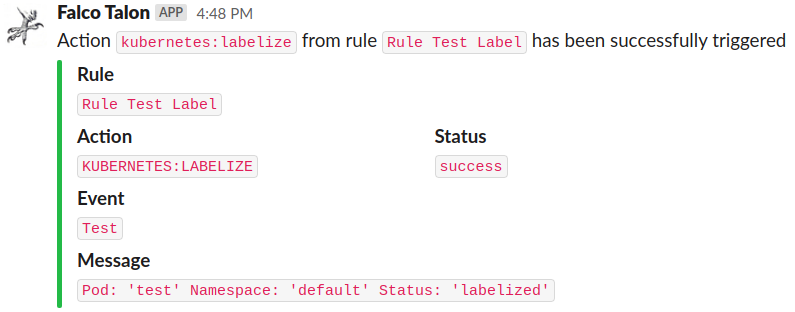
Results:

Loki
| Setting | Default | Description |
|---|---|---|
url |
n/a | http://{domain or ip}:{port} |
user |
n/a | User for Grafana Logs |
api_key |
n/a | API Key for Grafana Logs |
tenant |
n/a | Add the Tenant header |
custom_headers |
n/a | Custom HTTP Headers |
Elasticsearch
| Setting | Default | Description |
|---|---|---|
host_port |
n/a | http://{domain or ip}:{port} |
user |
n/a | User for Grafana Logs |
password |
n/a | Password for Grafana Logs |
index |
falco-talon |
Elasticsearch index |
suffix |
daily |
Date suffix for index rotation : daily (default), monthly, annually, none |
create_index_template |
true |
Create the index template at the init if it doesn’t exist |
number_of_shards |
3 |
Number of shards for the index (if create_index_template is true) |
number_of_replicas |
3 |
Number of replicas for the index (if create_index_template is true) |
custom_headers |
n/a | Custom HTTP Headers |
SMTP
| Setting | Default | Description |
|---|---|---|
host_port |
n/a | Host:Port of SMTP server |
user |
n/a | User for SMTP |
password |
n/a | Password for SMTP |
from |
n/a | From |
to |
n/a | To (comma separated list of adresses) |
format |
html |
Format of the email (text, html) |
tls |
false |
Use TLS connection |
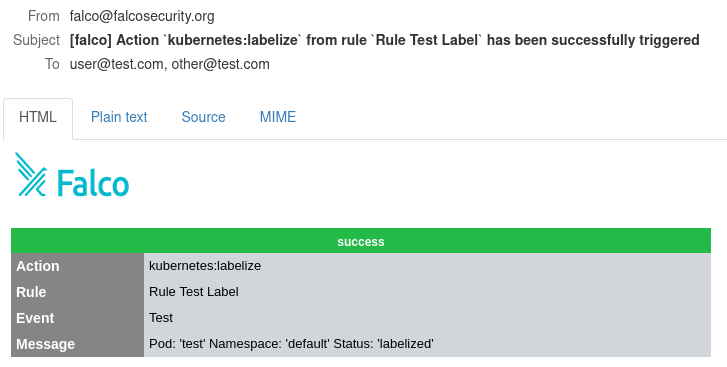
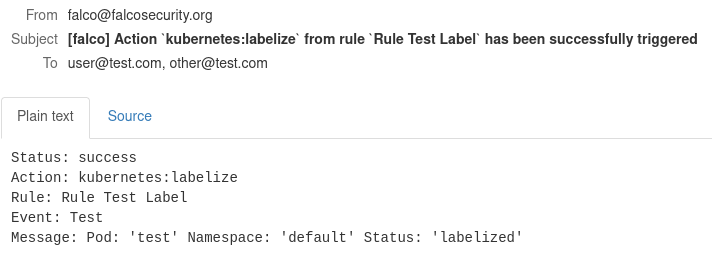
Results:
Webhook
| Setting | Default | Description |
|---|---|---|
url |
n/a | URL |
http_method |
POST |
HTTP Method |
user_agent |
Falco-Talon |
User Agent |
content_type |
application/json; charset=utf-8 |
Content Type |
custom_headers |
n/a | Custom HTTP Headers |
Results:
{"pod":"test","namespace":"default","action":"kubernetes:labelize","status":"success"}
Configuration
The static configuration of Falco Talon is set with a .yaml file (default: ./config.yaml) or with environment variables.
| Setting | Env var | Default | Description |
|---|---|---|---|
listen_address |
LISTEN_ADDRESS |
0.0.0.0 |
Listten Address |
listen_port |
LISTEN_PORT |
2803 |
Listten Port |
rules_files |
RULES_FILES |
n/a | File with rules |
watch_rules |
WATCH_RULES |
true |
Reload rules if they change |
print_all_events |
PRINT_ALL_EVENTS |
true |
Print in logs all received events, not only those which match |
kubeconfig |
KUBECONFIG |
n/a | Kube config file, only if Falco Talon runs outside Kubernetes |
log_format |
LOG_FORMAT |
color |
Log Format: text, color, json |
default_notifiers |
DEFAULT_NOTIFIERS |
n/a | List of notifiers which are enabled for all rules |
notifiers_x |
NOTIFIERS_X |
n/a | List of notifiers with their settings |
Example:
listen_address: "0.0.0.0"
listen_port: "2803"
rules_files: "./rules.yaml"
kubeconfig: "./kubeconfig.yaml"

default_notifiers:
  - slack

notifiers:
  slack:
    webhook_url: "https://hooks.slack.com/services/XXXX"
    username: "Falco Talon"
    footer: ""
Rules
Note The rules are evaluated from top to bottom. Multiple rules files can be used (repeat the
-rflag), the first file is overriden by the following ones (strings are replaced, lists are appended, …).
The syntax for the rules files is:
- action: <string,mandatory>
  actionner: <string,mandatory>
  continue: <bool>
  ignore_errors: <bool>
  parameters:
    <string>: <string>
    <string>:
      - <string>
      - <string>
    <string>:
      <string>: <string>
      <string>: <string>

- rule: <string,mandatory>
  match:
    rules:
      - <string>
      - <string>
    priority: <string>
    tags:
      - <string>, <string>, <string>
      - <string>, <string>
    output_fields:
      - <string>=<string>, <string>=<string>
      - <string>!=<string>, <string>=<string>
  continue: <bool>
  dry_run: <bool>
  actions:
    - action: <string,mandatory>
    - action: <string,mandatory>
      actionner: <string,mandatory>
      continue: <bool>
      ignore_errors: <bool>
      parameters:
        <string>: <string>
        <string>:
          - <string>
          - <string>
        <string>:
          <string>: <string>
          <string>: <string>
  notifiers:
    - <string>
    - <string>
The rules files contain 2 types of blocks:
action: defines an action that can be reused by different rulesrule: defines a rule to match with events and run actions
For the action block, the settings are:
action: (mandatory) name of action to triggeractionner: name of the actionner to usecontinue: iftrue, no more action are applied after this one (each actionner has its own default value).ignore_errors: iftrue, ignore the errors and avoid to stop at this action.parameters: key:value map of parameters for the action. value can be a string, an array (slice) or a map.
For the rule block, the settings are:
rule: (mandatory) Name of your rulematch: the section to define the criterias to matchrules: (list) (ORlogic) Falco rules to match. If empty, all rules match.priority: Priority to match. If empty, all priorities match. Syntax is like:>=Critical,<Warning,Debug.tags: (list) (ORlogic) Comma separated lists of Tags to match (ANDlogic). If empty, all tags match.output_fields: (list) (ORlogic) Comma separated lists of key:comparison:value for Output fields to match (ANDlogic). If emtpy, all output fields match.
actions: the list of actions to sequentially run, they can refer to anactionblock or defined locallyaction: (mandatory) name of action to trigger, can refer to anactionblockactionner: name of the actionner to usecontinue: iftrue, no more action are applied after this one (each actionner has its own default value).ignore_errors: iftrue, ignore the errors and avoid to stop at this action.parameters: key:value map of parameters for the action. value can be a string, an array (slice) or a map.
continue: iftrue, no more rule are compared after the rule has been triggered (default istrue).dry_run: iftrue; the action is not applied (default:false).notifiers: list of notifiers to enabled for the action, in addition with the defaults.
Examples:
- action: Terminate Pod
  actionner: kubernetes:terminate
  parameters:
    ignoreDaemonsets: false
    ignoreStatefulsets: true

- action: Disable outbound connections
  actionner: kubernetes:networkpolicy
  parameters:
    allow:
      - "192.168.1.0/24"
      - "172.17.0.0/16"
      - "10.0.0.0/32"

- rule: Suspicious outbound connection
  match:
    rules:
      - Unexpected outbound connection destination
  actions:
    - action: Disable outbound connections
      ignore_errors: true
    - action: Terminate Pod # ref to a re-usable action
      parameters:
        gracePeriods: 2
Usage
$ falco-talon --help

Falco Talon is a Response Engine for managing threats in Kubernetes
It enhances the solutions proposed by Falco community with a dedicated,
no-code solution. With easy rules, you can perform actions over compromised pods

Usage:
  falco-talon [command]

Available Commands:
  check       Check Falco Talon Rules file
  completion  Generate the autocompletion script for the specified shell
  help        Help about any command
  server      Start Falco Talon
  version     Print version of Falco Talon.

Flags:
  -c, --config string       Falco Talon Config File (default "/etc/falco-talon/config.yaml")
  -h, --help                help for falco-talon
  -r, --rules stringArray   Falco Talon Rules File (default [/etc/falco-talon/rules.yaml])

Use "falco-talon [command] --help" for more information about a command.
$ falco-talon server --help

Start Falco Talon

Usage:
  falco-talon server [flags]

Flags:
  -h, --help   help for server

Global Flags:
  -c, --config string       Falco Talon Config File (default "/etc/falco-talon/config.yaml")
  -r, --rules stringArray   Falco Talon Rules File (default [/etc/falco-talon/rules.yaml])
$ falco-talon check --help

Check Falco Talon Rules file

Usage:
  falco-talon check [flags]

Flags:
  -h, --help   help for check

Global Flags:
  -c, --config string       Falco Talon Config File (default "/etc/falco-talon/config.yaml")
  -r, --rules stringArray   Falco Talon Rules File (default [/etc/falco-talon/rules.yaml])
Docker images
The docker images for falco-talon are built using ko
To generate the images to test locally you can run mage buildImagesLocal
Deployment
Helm
The helm chart is available in the folder deployment/helm.
Two config files are provided:
values.yamlallows you to configureFalcon Talonand the deploymentrules.yamlcontains rules to set
cd deployment/helm/
helm install falco-talon . -n falco --create-namespace
Configure Falcosidekick
Once you have installed Falco Talon with Helm, you need to connect Falcosidekick by adding the flag --set falcosidekick.config.webhook.address=http://falco-talon:2803
helm install falco falcosecurity/falco --namespace falco \
  --create-namespace \
  --set tty=true \
  --set falcosidekick.enabled=true \
  --set falcosidekick.config.webhook.address=http://falco-talon:2803
License
MIT
Author
Thomas Labarussias (https://github.com/Issif)